Netgear WGR614v9 Won’t Turn On: Troubleshooting Guide
 By Eamp
2026-06-23
0 Comments
By Eamp
2026-06-23
0 Comments
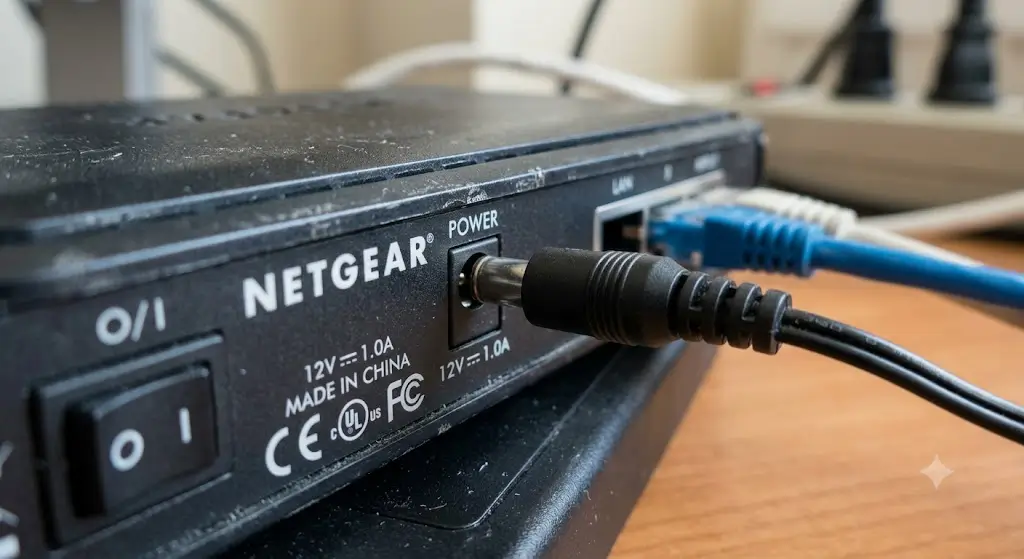
If a Netgear WGR614v9 suddenly stopped working and will not power on, the problem is usually simple at first: a loose power connection, a bad outlet, or a failed adapter. If those checks do not help, the issue may be internal hardware damage such as failed capacitors or another board-level fault.
If a Netgear WGR614v9 suddenly stopped working and will not power on, the problem is usually simple at first: a loose power connection, a bad outlet, or a failed adapter. If those checks do not help, the issue may be internal hardware damage such as failed capacitors or another board-level fault.
The safest approach is to start with external power checks, then move to a reset test, and only open the device if you have the skills and accept the risk.ifixit+1
Common Symptoms
A router with a power problem often shows one or more of these signs:
-
No lights at all on the front panel.
-
The power light blinks briefly and then goes out.
-
The router feels completely unresponsive after being plugged in.
-
Wi-Fi disappears and the router cannot be reached from a wired connection.
-
The unit only works intermittently or after wiggling the power plug.
These symptoms often point to a power delivery issue rather than a software problem.thetechwire+1
Possible Causes
Loose or incorrect power connection
The router may simply not be seated properly at the power port, or the outlet may not be supplying power. A poor connection can stop the router from starting even when the device itself is fine.ifixit
Failed power adapter
A damaged adapter can no longer provide stable voltage, which means the router never gets enough power to boot. This is one of the most common causes when a router suddenly dies.ifixit+1
Internal hardware failure
If the adapter works but the router still stays dead, the fault may be inside the router. Older devices can develop failed capacitors or burned components that prevent startup.ifixit
Overheating or age-related wear
Routers that have run for years can fail from heat stress and general component aging. Even if they worked earlier in the day, weakened parts can give out without warning. thetechwire
Corrupted firmware or bad reset state
Although a total no-power symptom is usually hardware-related, a failed boot or bad configuration can sometimes make a router seem dead. A reset is worth trying before assuming the device is ruined.novahq+1
Step-by-Step Troubleshooting
1) Check the power path
Purpose: Confirm the router is actually receiving power from the wall to the device.
Instructions: Unplug the router, then firmly reconnect the round plug to the router and the other end to a known-working outlet or power strip. Try a different outlet if possible. Make sure the adapter is fully seated and not loose.ifixit
Expected result: If the problem was a loose plug or dead outlet, the router should begin showing lights or at least react when powered on.ifixit
2) Inspect the adapter and cable
Purpose: Rule out a damaged or failing power supply.
Instructions: Look for frayed cable sections, bent plug tips, heat damage, or a loose connection where the adapter meets the router. If you have an identical or compatible replacement adapter with the correct rating, test the router with it.ifixit
Expected result: A working replacement adapter should restore power if the original adapter has failed.ifixit
3) Power cycle the router
Purpose: Clear a temporary fault in the router’s startup state.
Instructions: Unplug the adapter from the outlet, wait about 30 seconds, and plug it back in. Leave the router connected to power only during the test.ifixit
Expected result: If the router had become stuck, it may restart normally and show status lights.ifixit
4) Try a factory reset
Purpose: Rule out a firmware or configuration problem.
Instructions: With the router plugged in, press and hold the reset button using a paper clip for several seconds, then release it and wait for the unit to reboot. If the device is truly dead and has no lights at all, this step may not help, but it is still worth trying once.youtubenovahq
Expected result: A successful reset should restore default settings and bring the router back to a usable state.youtube
5) Disconnect all extra cables
Purpose: Eliminate interference from other devices or bad Ethernet connections.
Instructions: Leave only the power cable connected. Remove Ethernet cables, modem connections, and any other accessories, then test the router again.novahq
Expected result: If another connected device or cable was causing the problem, the router may start normally once isolated.novahq
6) Test with a known-good adapter
Purpose: Confirm whether the router or the power supply is at fault.
Instructions: Use a replacement adapter that matches the original’s output specification. Do not use a random charger with a different voltage or polarity.ifixit
Expected result: If the router powers on with the replacement, the old adapter is the problem. If it still stays dead, the fault is likely internal.ifixit
Advanced Diagnostics
For experienced users, the next checks focus on hardware failure signs.
-
Open the adapter and inspect for bulging or swollen capacitors if you know how to work safely with electronics.ifixit
-
Open the router only if you are comfortable with small electronics repair and accept the risk of further damage. Look for swollen capacitors, burned areas, or visibly damaged components.ifixit
-
If the router briefly powers on but does not fully boot, recovery procedures such as continuous ping testing or firmware recovery may be possible on some failed units.ravisagar+1
-
If you have a multimeter, verify that the adapter is producing the correct output voltage before assuming the router is dead.
Safety warning
Do not open a power adapter or router unless you understand the risks. Capacitors can retain charge, and a failed power supply may have hidden electrical hazards. If you are unsure, stop at the external checks and seek professional help.
When Repair Is Worth It
Repair can make sense when the problem is clearly the power adapter, since replacing the adapter is usually inexpensive and straightforward. It is also worth considering repair if the router is still otherwise suitable for your needs and the failure looks limited to a small number of components.ifixit
Repair is more practical when you can identify a specific, fixable issue such as a bad adapter, loose connector, or obvious capacitor failure. In those cases, the cost is often lower than replacing the whole device.ifixit
When Replacement Makes More Sense
Replacement is usually the better choice if the router has no signs of life after trying a known-good adapter and basic reset steps. It also makes sense when the router is very old, has repeated failures, or shows burned or damaged internal parts.thetechwire+2
If the repair would require board-level work, the time and cost may exceed the value of an aging router. In that case, replacing it is usually the safer and more reliable option.
Prevention Tips
-
Use a surge protector to reduce damage from power spikes.
-
Keep the router in a cool, open area so heat can escape.
-
Avoid bending or stretching the power cable near the plug.
-
Periodically check that the adapter fits securely.
-
Replace failing power strips and loose wall outlets early.
-
Restart the router occasionally to keep it running cleanly.
-
Avoid stacking the router under other hot electronics.
Good maintenance does not prevent every failure, but it can reduce stress on the power supply and internal components. Older routers especially benefit from better airflow and cleaner power.
Frequently Asked Questions
Why did my router stop working all of a sudden?
The most common reasons are a bad power adapter, a loose connection, or internal hardware wear. Sudden failure often points to power-related trouble rather than settings.thetechwire+1
Can a router be fixed if it won’t turn on at all?
Sometimes, yes. If the adapter is bad, replacing it may solve the issue. If the router’s internal components are damaged, repair may be possible but is often not cost-effective.ifixit
Is a reset useful if there are no lights?
A reset is worth trying once, but if the router shows absolutely no signs of power, the issue is more likely electrical than software-related.youtubeifixit
How do I know if the power adapter is the problem?
The best test is a compatible replacement adapter with the correct output rating. If the router powers on with the replacement, the original adapter has failed.ifixit
Should I open the router myself?
Only if you already have experience with electronics repair. Opening the device can expose you to electrical hazards and may make the damage worse if done incorrectly.
Thoughts
For a Netgear WGR614v9 that suddenly will not turn on, the most likely causes are a loose power connection, a failed adapter, or age-related hardware failure. Start with the simple external checks, then move to a reset and adapter test, and only consider internal repair if you are comfortable working safely with electronics.novahq+3
If the router still shows no lights after a known-good adapter and power cycle, replacement is often the most practical next step.