Android Phone Charging Slow: Troubleshooting Guide
 By Eamp
2026-06-23
0 Comments
By Eamp
2026-06-23
0 Comments
how to clean a charging port, how to test a USB cable, Android battery health tips, fast charging settings guide, when to replace a phone battery
Slow charging on an Android phone usually comes from the charging chain, not from the phone suddenly “going bad.” The most common culprits are a weak charger, a worn cable, debris in the port, heat, or a battery that has aged over time.support.google+1
The best fix is to test the charger, cable, port, and phone separately so you can find the weak link instead of guessing.slashgearyoutubesupport.google
Common Symptoms
A phone with slow charging often shows these signs:
-
Battery percentage rises much more slowly than usual.
-
Fast charging no longer appears on the screen.
-
The phone charges only when the cable is held at a certain angle.
-
Charging is slower while the phone is hot or being used.
-
The phone charges from one charger but not another.youtubesupport.google+1
Possible Causes
Cable problems
A cable can still look fine even when it has internal damage or poor current handling. Older, cheap, bent, or worn cables often cause slow charging.youtubesupport.google
Charger mismatch
A low-watt adapter, laptop USB port, car charger, or unsupported brick can limit speed even if everything else is fine. The phone may charge safely, but not quickly.support.google+1
Dirty charging port
Lint and dust can pack tightly in the port and prevent proper contact. Even a small amount of buildup can interfere with charging speed.youtubesupport.google
Heat throttling
Android phones reduce charging speed when the device gets warm. Heavy apps, gaming, or charging in hot environments can all slow the process.youtubehowtogeek+1
Disabled fast charging settings
Some phones have charging settings that can turn fast charging off. If those options are disabled, the phone may charge more slowly even with a good charger.youtube+1
Battery wear
If the phone still charges slowly after you test a known-good cable, charger, and port, the battery itself may be degraded. Older batteries often lose efficiency and charge less effectively.youtubesupport.google
Step-by-Step Troubleshooting
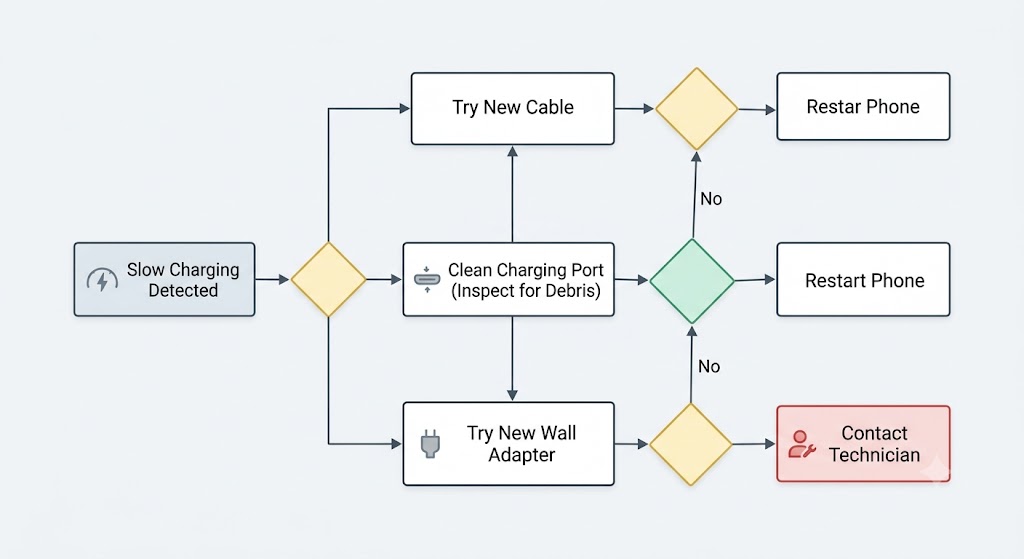
1) Check the charger and cable first
Purpose: Find the most common and easiest-to-fix cause.
Instructions: Use a different charging cable and wall adapter that you know work properly. Avoid laptop ports and weak USB sources while testing.slashgearyoutubesupport.google
Expected result: If charging speed improves, the original cable or charger is the problem.youtubesupport.google
2) Inspect the charging port
Purpose: Rule out lint, dust, or damaged contact points.
Instructions: Shine a light into the port and look for packed debris. If you see lint, remove it carefully with a dry, non-metal tool and do not force anything inside.support.googleyoutube
Expected result: The cable should fit more securely and charging speed should improve if blockage was the issue.support.google
3) Check for heat
Purpose: See whether the phone is throttling charging to protect itself.
Instructions: Stop using heavy apps, games, or video playback while charging. Remove thick cases if the phone is hot and place it in a cool, shaded area.howtogeekyoutubesupport.google
Expected result: If heat was the cause, the phone should charge faster once it cools down.youtubesupport.google
4) Turn on fast charging
Purpose: Make sure the phone is allowed to charge at full speed.
Instructions: Open Settings, go to Battery or Device Care, and look for charging settings. Enable fast charging if it is turned off.youtube+1
Expected result: Supported phones should resume faster charging once the setting is enabled.youtube+1
5) Restart the phone
Purpose: Clear temporary software glitches.
Instructions: Restart the device normally, then test charging again with the phone idle.slashgearyoutube
Expected result: A reboot may restore normal charging behavior if the issue was temporary.slashgear
6) Test with the screen off and apps closed
Purpose: Reduce battery drain during charging.
Instructions: Close heavy apps, leave the phone alone, and charge with the screen off for a while. If needed, enable Battery Saver or Airplane Mode during testing.youtube+2
Expected result: The charging rate should improve if background usage was consuming power at the same time.youtube+1
7) Compare against another phone
Purpose: Separate cable or charger issues from phone issues.
Instructions: Try the same cable and charger on another compatible phone, or test your phone with a different compatible setup.youtube+1
Expected result: If one setup works better, you have identified the failing part of the charging chain.youtube+1
Advanced Diagnostics
If you are comfortable digging deeper, these checks can help narrow things down:
-
Check the charger’s wattage and output rating against what your phone supports.support.google+1
-
Review battery usage to see whether a background app is draining power unusually fast.slashgear
-
Use the phone’s built-in diagnostics, if available, to check battery health and charging behavior.youtube
-
Test charging in a cool room with the phone fully idle to see whether the issue is environment-related.howtogeekyoutube
-
If the port feels loose or only works at one angle, the connector may be worn and may need repair.youtube
When Repair Is Worth It
Repair is worth considering when the charging port is dirty, loose, or physically worn but the rest of the phone still works well. It can also make sense if the battery is replaceable at a reasonable cost and the phone still meets your needs.youtubesupport.google
If the only problem is a bad cable, adapter, or port cleaning, the fix is usually inexpensive and practical.youtubesupport.google
When Replacement Makes More Sense
Replacement may be the better choice when the battery is heavily degraded, the charging port is physically damaged, or the phone is already old enough that multiple repairs are likely soon. If the phone still charges too slowly after trying known-good accessories and cleaning, the cost of deeper repair may not be worthwhile.youtubesupport.google
It also makes sense to replace the device if it no longer supports the charging standards you need for daily use.
Prevention Tips
-
Use a quality cable and charger matched to your phone’s charging support.
-
Keep the charging port clean and free of pocket lint.
-
Avoid charging the phone in hot cars or direct sunlight.
-
Do not game or stream video while trying to fast charge.
-
Use a phone case that does not trap excessive heat.
-
Replace frayed cables before they fail completely.
-
Store chargers and cables carefully to prevent internal wire damage.
These habits help preserve both charging speed and battery health over time.
Frequently Asked Questions
Why is my Android charging slowly all of a sudden?
The most common reasons are a bad cable, weak charger, dirty port, or heat-related throttling. A battery that has aged can also charge more slowly.support.google+1
Can a dirty charging port really slow charging?
Yes. Dust and lint can block contact between the cable and the port, which can reduce charging speed or make charging inconsistent.youtubesupport.google
Does fast charging need to be turned on?
On many phones, yes. If the fast charging option is disabled in settings, the phone may charge more slowly even with the right charger.youtube+1
Why does my phone charge faster when it is off?
When the screen is off, the phone uses less power, so more of the incoming charge goes into the battery.youtube+1
How do I know if the battery is the real problem?
If a known-good cable, charger, clean port, and cool environment still do not improve charging speed, battery wear becomes a likely cause.youtubesupport.google
Final Thoughts
The most likely causes of slow Android charging are a weak cable, underpowered charger, debris in the port, or heat. Start with the easiest checks first, then move to settings, temperature, and battery health if the problem continues.youtube+1slashgearyoutubesupport.googleyoutube
If the phone still charges slowly after you have tested a good charger and cleaned the port, the battery or charging hardware may need repair or replacement.